Showing posts with label Trust. Show all posts

Tuesday, July 25, 2017

Salesforce Technology Model

Want to learn more about Salesforce's trusted cloud or just see how it's doing? You can head over to Trust.Salesforce.com at any time to see the real-time and historic status of Salesforce's availability, performance, and vulnerabilities.
If you’re in a highly regulated industry, we know that security is especially important to you. Salesforce commits to the highest security standards, providing you with transparency and real-time availability. And Salesforce scales that same standard to all its customers, no matter their industry.
So how do Salesforce do that? It’s not magic, folks, it’s multitenancy.
With Multitenancy in place, Salesforce handles the maintenance of servers, storage, bandwidth, hardware, and networks. That means that Salesforce' customers don’t have to spend time and money buying hardware and managing data centers. Salesforce shoulders that weight so that its customers can focus on innovation and evolving their business.
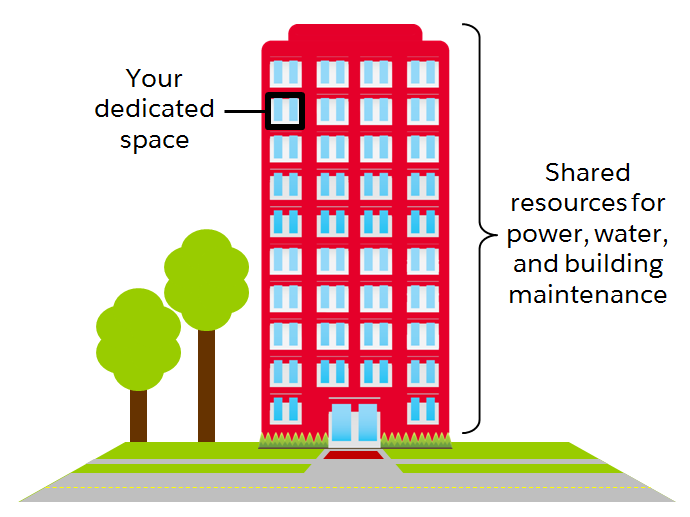
That, in a nutshell, is multitenancy: every customer shares the same infrastructure and runs on the same platform. But, like an apartment building, each unit is unique and accessible only to the owner.
Having all their customers under one roof allows them to share Salesforce's investment in trust and innovation with everyone. Hence Salesforce is able to deliver top notch security features wanted by smaller companies, and the flexibility that enterprise companies crave.
But is security in a shared environment really secure? What happens with upgrades? Answer is Salesforce's metadata-driven architecture.
Metadata is widely defined as “data about data”, but what does that really mean? When we talk about metadata at Salesforce, we’re talking about our metadata-driven architecture that allows each customer to customize their own instance of Salesforce.
Edgar's Mission, A customer of Salesforce created their own custom tab called "Animals" to help them track each of their barnyard residents. Using that Animals tab, employees at Edgar's Mission can add information about every sheep, chicken, and goat they work with. This is great for Edgar’s Mission, but it's great for you too! Maybe you don't call it “Accounts” or “Animals.” For you it may be “Stores,” “Patients,” or “Buyers.” It’s all up to you!
The custom tab, the custom fields, the automatic reminders, even any standard reports and Chatter they might wish to use—all of this is metadata. It's the structure of your Salesforce instance, with all of your custom and standard functionality.
Salesforce separates our customers’ customizations into a special metadata layer, so we can update and improve our platform in the background without touching any of their data or customizations. That means that we can give Edgar’s Mission (and all of our other customers) upgrades three times per year with great new features without altering their farm data or breaking their custom “Animals” tab. All of these standard and custom configurations, functionality, and code in your org are metadata. Part of the reason you can move so fast on the platform is that Salesforce knows how to store and serve you that metadata immediately after you create it.
Because their metadata exists in its own layer, Edgar’s mission can customize to their heart’s content. And instead of devoting a resource to developing an infrastructure and keeping things up and running, they can staff up where it counts for their most important customers... in the paddock.
Fueled by the easy accessibility of the metadata layer, the cloud, and Software as a Service (SaaS), this is, ultimately, the power of the platform. It allows you to innovate quickly, and get to market faster with solutions for your customers, partners, and employees—or even your sheep!
Salesforce designs its apps so that customers can do business exactly the way they want. It’s Salesforce' job to equip them with an infrastructure that can be customized and altered at any time to move as fast as they do. Multiple studies show that developing with Salesforce is 5 times faster than traditional application development.
Traditionally, if you wanted to build an app, you’d need hardware and software. You’d have to define access and security, setup reports and analytics, and then actually build the app. If you wanted the app to be mobile and social, you’d have to set that up separately.
Building an app with Salesforce is different. There is no installation of hardware and software, and there are standard options for defining security and user access, creating reports, and making the app social and mobile. Metadata allows us to have all of this pre-built in a separate layer for our customers, so all they have to do is add any customizations they may want as icing on the cake.

Components of Salesforce' Metadata-Driven Architecture

Salesforce' metadata-driven architecture allows it's customers to customize Salesforce in two different ways to fit their unique business needs. In each case, metadata is what carries over each customer’s unique customizations and automatically allows every app to deploy to mobile and account for varying currencies and languages.

Point-and-Click Configuration for all

Configuration allows anyone to quickly and easily configure your applications with a point-and-click interface. This means you don’t have to rely on a developer to create the ideal apps for whatever business goals you’ve set. It could be as simple as renaming accounts to coincide with your industry, just like Edgar’s Mission did with their “Animals” tab. 80% of all our user customizations are made through these basic point-and-click configurations.
IT sees the value in point-and-click too. Opening up simple app development to users gives developers more time to work on custom code for more advanced things like user interfaces and business logic. There’s no need for IT to build services like workflow, collaboration, dashboards, or mobile interfaces, or worry about managing its own infrastructure. Salesforce handles the scaling, performance, database configuration, servers, and storage.

Custom Code for developers

Creating custom code is slightly more complicated than configuration. When a company decides it needs advanced functionality, they can have a developer write custom code to achieve it. New features, functionality, and user interfaces help a business achieve exactly what it wants. And it’s entirely cloud-based, so your developer will only have to write it once to run it everywhere.
Another way to tailor your Salesforce experience is to connect your back-office applications with APIs. If you’re a developer, you probably already know what an API is. But for those who are new to programming, API stands for Application Programming Interface, and it’s essentially a bridge between two pieces of software, allowing them to connect to each other and exchange information.
Since we made our metadata openly available through APIs, you can connect Salesforce to anything. That includes any of the thousands of our partner apps in the AppExchange. The possibilities are endless.

Saturday, July 1, 2017

Salesforce Admin Beginner - Salesforce Platform Basics

  1. An app in Salesforce is a set of objects, fields, and other functionality that supports a business process. You can see which app you’re using and switch between apps using the App Launcher.
  2. Objects are tables in the Salesforce database that store a particular kind of information. There are standard objects like Accounts and Contacts and custom objects like the Property object you see in the graphic.
  3. Records are rows in object database tables. Records are the actual data associated with an object. Here, the 211 Charles Street property is a record.
  4. Fields are columns in object database tables. Both standard and custom objects have fields. On our Property object, we have fields like Address and Price.
Another important term that’s hard to capture in a picture is org. Org is short for organization, and it refers to a specific instance of Salesforce. The image here is taken from DreamHouse’s org. Your company can have one or multiple orgs.

Developing without code is known as declarative development. With declarative development, you use forms and drag-and-drop tools to perform powerful customization tasks. The platform also offers programmatic development, which uses things like Lightning components, Apex code, and Visualforce pages. But if you’re not a programmer, you can still build some amazing things on the platform.

By creating a single custom object, you can totally change how your organization collaborates. High impact, low effort. As you start building with the platform, keep your eye out for processes with:
  • Heavy email collaboration
  • Reliance on spreadsheets
  • Shared local documents
  • Time-intensive, repetitive manual steps
  • Impact on only a few departments (you want to minimize the number of stakeholders while you’re still learning)
Processes with these traits are great candidates for early projects on the Salesforce platform.
Using the Salesforce platform, We can create a custom app that helps company’s HR employees streamline and automate the hiring and onboarding process. Here are some things the custom app can do.
  • List job openings.
  • Store applicants for each job opening.
  • Send automated reminders to hiring managers.
  • Store orientation and training plans.
  • Manage equipment orders.
  • Track employee time off.
Like any app built on the platform, the HR app we create is available for the Salesforce1 mobile app.
When you build your IT ticketing system in the same place as your CRM, you get a lot of benefits. All your users and their information are already there. You can track cases per user and promote collaboration between IT and employees. Here are some other ways to streamline IT using the Salesforce platform:
  • Create reports and dashboard to aggregate and analyze requests.
  • Send confirmation emails when requests are received, completed, or updated.
  • Queue incoming requests.
  • Create custom forms for employee requests and create a knowledge base for common issues.
  • Track employee hardware assets.
Here are a few use cases for different departments.
Finance
  • Budget management
  • Contract management
  • Pricing
Product
  • Warranty management
  • Preproduction testing
  • Product ideas and innovation
Supply Chain
  • Procurement
  • Vendor management
  • Logistics
Ops
  • Asset and facilities management
  • Merger and acquisition enablement
  • Business agility
When you think about the Salesforce architecture, imagine a series of layers that sit on top of each other. Sometimes it helps to think of it as a cake because cake is delicious, and it makes everything better.
There’s a lot to unpack here, but let’s focus on the most important points.
  • Salesforce is a cloud company. Everything we offer resides in the trusted, multitenant cloud.
  • The Salesforce platform is the foundation of our services. It’s powered by metadata and made up of different parts, like data services, artificial intelligence, and robust APIs for development.
  • All our apps sit on top of the platform. Our prebuilt offerings like Sales Cloud and Marketing Cloud, along with apps you build using the platform, have consistent, powerful functionality.
  • Everything is integrated. Our platform technologies like Einstein predictive intelligence and the Lightning framework for development are built into everything we offer and everything you build.
There are few terms in here that are extra important for you to understand: trust, multitenancy, metadata, and the API.
At Salesforce, trust is our top priority. Not only are you keeping your sensitive data in your org, you’re also building functionality vital to your company’s success on our platform. Our responsibility to keep your data and functionality safe is not something we take lightly, which is why we’re always transparent about our services.
Our trust site, trust.salesforce.com, is a vital resource. You can use it to view performance data and get more information about how we secure your data. It also shows you any planned maintenance we’ll be performing that might impact your access to Salesforce.
Salesforce is set up more like an apartment building. Your company has its own space in the cloud, but you have all kinds of neighbors, from mom-and-pop shops to multinational corporations.
This idea is multitenancy. Salesforce provides a core set of services to all our customers in the multitenant cloud. No matter the size of your business, you get access to the same computing power, data storage, and core features.
Trust and multitenancy go hand in hand. Despite the fact that you’re sharing space with other companies, you can trust Salesforce to keep your data secure. You can also trust that you’re getting the latest and greatest features with automatic, seamless upgrades three times a year. Since Salesforce is a cloud service, you never have to install new features or worry about your hardware. All this is possible because of multitenancy.
Metadata is data about data.  When we say data about data, we’re really talking about the structure of your Salesforce org.
Let’s think about an object like Property. When our friends at DreamHouse use Salesforce, they input and view data about properties. For example, a property can be located in Boston, cost $500,000, and have 3 bedrooms.
Now, imagine you stripped away all that specific data. What are you left with? You are left with the Property object along with all its fields, like address, price, and number of bedrooms. You can also have page layouts, security settings, and any other customizations you’ve made.
All of these standard and custom configurations, functionality, and code in your org are metadata. Part of the reason you can move so fast on the platform is that Salesforce knows how to store and serve you that metadata immediately after you create it.
APIs allow different pieces of software to connect to each other and exchange information.
If that sounds kind of abstract, take a quick look at the computer you’re working on right now. You can probably find a series of ports of various shapes and sizes that support different kinds of connections. These are like the hardware version of APIs. You don’t have to know how the USB port works. All you have to understand is that when you plug your phone into a USB port, it passes information to your computer.
APIs are similar. Without knowing the details, you can connect your apps with other apps or software systems. The underlying technology takes care of the specifics of how information passes throughout the system.
When you add a custom object or field, the platform automatically creates an API name that serves as an access point between your org and the database. Salesforce uses that API name to retrieve the metadata and data you’re looking for.
For example, we can use a contact’s Name field in a bunch of places, like the Salesforce1 mobile app, a custom page, or even an email template. That’s all possible because of the API name.
The core of the API’s power is that all of your data and metadata is API enabled. This might not seem like a big deal right now, but the API gives Salesforce insane flexibility. And we mean insane.
While it’s truly amazing that you can integrate your Salesforce data with Minecraft, there are also many practical applications for the API. Every time you use Salesforce, whether you’re using standard functionality or building a custom app, you’re interacting with the API.

There are three main categories in the Setup menu: Administration, Platform Tools, and Settings. Let’s take a look at what’s available.


  • Administration: The Administration category is where you manage your users and data. You can do things like add users, change permissions, import and export data, and create email templates.
  • Platform Tools: You do most of your customization in Platform Tools. You can view and manage your data model, create apps, modify the user interface, and deploy new features to your users. If you decide to try your hand at programmatic development, Platform Tools is where you manage your code as well.
  • Settings: Finally, Settings is where you manage your company information and org security. You can do things like add business hours, change your locale, and view your org’s history.
1   Company Information
  • At-a-glance view of your org
  • Find your org ID
  • See your licensing information
  • Monitor important limits like data and file usage
2 Users
  • Reset passwords
  • Create new users and deactivate or freeze existing users
  • View information about your users
3 Profiles
  • Manage who can see what with user profiles
  • Create custom profiles
4 View Setup Audit Trail
  • See 6 months of change history in your org
  • Find out who made changes and when
  • Tool for troubleshooting org configuration issues
5 Login History
  • See 6 months of login history for your org
  • View date, time, user, IP address, and more login data
  • Use for security tracking and adoption monitoring
Salesforce has a community of partners that use the flexibility of the Salesforce platform to build amazing apps that anyone can use. These apps are available (some for free, some at a cost) for installation on AppExchange.

Follow these steps to develop a good AppExchange strategy.
  1. Identify departments that use or plan to use Salesforce. These are your primary stakeholders.
  2. Research what’s available on AppExchange that best meets your stakeholder requirements. Discuss business cases with department heads to determine exact needs. Here are some good questions to ask:
    1. What business problem are you trying to solve?
    2. What are your main pain points right now?
    3. How many users need this app?
    4. What’s your budget?
    5. What’s your time line?
    These questions help you identify apps that are the best fit for each department or business case.
  3. When you find an app that you think meets your needs, download the app in a test environment (like a free Developer Edition or sandbox). Ensure that the app you’re installing doesn’t interfere with any other apps you’ve installed or customizations you’ve made.
  4. If you’re choosing between multiple apps, take some time to evaluate what you’ve tested. Determine whether there are feature gaps or unwanted functionality. If necessary, invite your stakeholders to demo the apps and provide feedback.
  5. You’re ready to go! You’ll install and deploy your app in your production environment. Make sure you keep your users in the loop about what’s changing, and provide training and documentation as necessary.
Sandboxes are copies of your organization in a separate environment. They’re used for development and testing. See Sandbox Overview.
Apps are installed using something called a package. To find the package:
  1. From Setup, search and select Installed Packages in the Quick Find box.
  2. Click the name of the package you installed. It will be the same name from the AppExchange download page.
  3. Click View Components to see more information about the package. The Package Details page shows you all the components, including custom fields, custom objects, and Apex classes in the package. This information helps you determine whether you have any conflicts in your own customizations.
As you start to explore AppExchange, be sure to check out free apps provided by Salesforce Labs. The great thing about Salesforce Labs apps, other than that they’re free, is that they’re open source. You can customize them as needed and peek under the hood to see how they work. It’s a great way to learn more about how the platform works.

Lightning Inter-Component Communication Patterns

Lightning Inter-Component Communication Patterns If you’re comfortable with how a Lightning Component works and want to build producti...