Showing posts with label Records. Show all posts

Sunday, August 27, 2017

Salesforce Developer Beginner - Platform Development Basics

Salesforce platform lets you develop custom data models and applications for desktop and mobile. And with the platform behind your development, you can build robust systems at a rapid pace.
And then there’s the Heroku platform. Heroku gives developers the power to build highly scalable web apps and back-end services using Python, Ruby, Go, and more. It also provides database tools to sync seamlessly with data from Salesforce.
And then there’s the host of Salesforce APIs. These let developers integrate and connect all their enterprise data, networks, and identity information.
And then there’s the Mobile SDK. The Mobile SDK is a suite of technologies that lets you build native, HTML5, and hybrid apps that have the same reliability and security as Salesforce1.
Three important terms: objects, fields, and records.
When you look at data in Salesforce, you might think that you're looking at a user interface sitting on top of a run-of-the-mill relational database. But what you’re actually looking at is an abstraction of the database that’s driven by the platform’s metadata-aware architecture.
In this abstraction, objects are our database tables. The fields on those objects are columns, and records are rows in the database. This analogy is true both for standard objects that come with Salesforce by default and custom objects that you build yourself.
Metadata forms the structure of your org. Whether you’re defining fields, business processes, or something more complex, metadata holds your configuration. The platform then renders your app’s metadata in the user interface along with its associated data.
This metadata-driven development model is one of the key differences between developing on the platform and developing outside of Salesforce. Because the platform is metadata-aware, it can auto-generate a significant part of your user experience for you. Things like dialogs, record lists, detail views, and forms that you’d normally have to develop by yourself come for free. You even get all the functionality to create, read, update, and delete (affectionately referred to as CRUD) custom object records in the database.
All this prebuilt functionality frees up your development time to work on more sophisticated custom features. Let’s take a look at how the metadata-driven development approach works in action.
The DreamHouse app is an example of what’s typically referred to as an internal employee productivity app. It’s built using various parts of the Salesforce platform. This diagram gives an overview of the system landscape of the DreamHouse application set. It includes Heroku services and other connected devices, but let’s focus on the core platform piece for the time being.
For DreamHouse, we’ve created three custom objects that support the app’s core functionality.
  • Brokers: information about partner brokers
  • Properties: photos and information about properties that are on the market
  • Favorites: properties customers have favorited
Let’s take a look at what the DreamHouse data model actually looks like. The platform provides a handy tool called Schema Builder so you can see your entity relationship model in action.
Salesforce offers a host of tools for point-and-click—or declarative—development. Most of these tools require little to no understanding of development principles: no code. Some development tasks, like writing validation rules or hooking up components with UI elements, are considered low code. That means they require some basic programmatic knowledge to complete, but aren’t so rigorous that they’re considered programmatic. For example, if you know something about logic, conditions, and CRUD operations, you can do more with Process Builder.
There are three core technologies to learn about as a Salesforce developer.
  • Lightning Component Framework: A UI development framework similar to AngularJS or React.
  • Apex: Salesforce’s proprietary programming language with Java-like syntax.
  • Visualforce: A markup language that lets you customize Salesforce pages with a powerful combination of Apex and JavaScript.
The Lightning Component framework is a user interface development framework for desktop and mobile. As its name suggests, it’s a component-based approach to UI development. Using prebuilt and custom Lightning components, you can quickly develop sleek and consistent UIs for your apps.
If you’re familiar with frameworks like AngularJS, React, or Polymer, you have a good idea of what to expect with Lightning components. The benefit, of course, is that Lightning components are ready to go with all your business data in Salesforce.
The Developer Console is the Salesforce integrated development environment (IDE) that you can use to develop, debug, and test code in your org.
Lightning Components XML markup contains both Lightning-specific and static HTML tags. It uses a <namespace:tagName>convention for its tags, which each represent a smaller, or child, component.
On the right side of the Developer Console, you also see some additional assets that are part of this component’s bundle. If you click on CONTROLLER, for example, you see some JavaScript. Lightning components use client-side JavaScript controllers and server-side Apex controllers. You can create and access those controllers, as well as other assets like component stylesheets, from the bundle menu.
Another great thing about Lightning components is that they’re mobile-ready. When you create apps for Salesforce1 mobile, you don’t have to worry about the way Lightning components display. You can just add them to the app and let the platform handle the rest.
Earlier, we talked about Process Builder as a low-code tool. While it’s low-code, you can also extend the functionality of Process Builder by writing a little code. Of course, extending Process Builder is only one of many ways you can use Apex to enhance your org’s functionality. 
Visualforce lets you create and customize pages in Salesforce as well as integrate with other standard web technologies, including HTML, CSS, and JavaScript.
The difference between Lightning components and Visualforce pages. The primary difference is right in the name. With Lightning components, you’re developing components that can be pieced together to create pages. With Visualforce, you’re developing entire pages at once. While Lightning components are newer and better for things like mobile development, there are several situations where it can make more sense to use Visualforce. Take a look at the table in User Interface Development Considerations for more details on when to use which.
Visualforce contains Visualforce markup, HTML markup, CSS, and JavaScript etc. The acronym SLDS may appear a few times. SLDS (Salesforce Lightning Design System) lets you style your pages so they match the look and feel of Salesforce’s new interface, Lightning Experience. Another thing to notice is that Visualforce uses a similar convention to Lightning components with <apex:tagName>. Before, we mentioned that Lightning components use JavaScript on the client-side and Apex on the server-side. Visualforce pages, on the other hand, use client-side Apex controllers and use JavaScript from static resources. As you continue to explore Visualforce, you’ll get very familiar with Apex controllres.
You can also access and preview Visualforce pages by searching Visualforce Pages from the Quick Find bar in Setup.
Declarative development in Salesforce is done using tools like Lightning App Builder and Process Builder. These tools require very little interaction with Salesforce’s underlying APIs.
As you move toward more programmatic development, you find a robust set of APIs that let you access your Salesforce data in a variety of ways. You already saw the API in action when we looked at Lightning components, Apex, and Visualforce.
Property__c property = [SELECT Name, Price__c from Property__c WHERE Id=:propId];
Put simply, every object in your org has an API name that lets you access data for that object. Let’s look at the SOQL query from the last unit again:
The __c denotes that the object is a custom object or field. This query is using the automatically created API access point for the Property object to retrieve information about properties in your org.
Here’s a brief look the APIs Salesforce provides and what they’re used for.


API
What you can do with it
SOAP API
Integrate your org’s data with other applications using standard SOAP protocols.
REST API
Access objects in your org using standard REST protocols.
Metadata API
Manage customizations in your org and build tools that manage your metadata model.
Tooling API
Build custom development tools for platform applications.
Marketing Cloud API
Expose Marketing Cloud capabilities with the REST API and get comprehensive access to most email functionality with the SOAP API.
Bulk API
Load, delete, and perform asynchronous queries on large data sets.
Streaming API
Send and receive notifications securely and efficiently. Notifications can reflect data changes in your org, or custom events.
Chatter REST API
Build UI for Chatter, Communities, Recommendations, Files, Topics, and more.
Mobile SDK
While it’s technically a software development kit, it’s worth including here. Integrate Native or Hybrid mobile apps directly with Salesforce.
While APIs can be used both within Salesforce and with your external systems, Heroku is all about interacting with the outside world. Heroku is a web development platform that lets you quickly build, deploy, and scale web apps.
One of the great things about Heroku is that you have a lot of flexibility in how you write your app. If you’re a Java nerd, you can write your app in Java. If you’re a diehard Python fan, Heroku won’t get in your way. PHP your jam? PHP to your heart’s content!
Heroku is built on Amazon Web Services (AWS), meaning a lot of infrastructure concerns you might have in standard web app development are taken care of for you. On top of that, Heroku Connect unifies your Salesforce data with your Heroku Postgres data so you don’t have to manage moving information across platforms. No worrying about infrastructure or data storage means more time for you to focus on new development..
The topics we’ve covered up to now are more or less the “essentials” of our development environment. But there are many other opportunities for you to flex your development skills and have some fun with the platform.

IoT

Depending on your industry, integrating Salesforce with the Internet of Things (IoT) may or may not be a necessity. However, with smart devices on the rise, it’s not a bad idea to get familiar with developing with IoT in mind.
For example, when DreamHouse real estate agents prepare to show a house to a potential buyer, there are things they always do, such as unlock the doors to the house, turn on the lights, and make sure the temperature is just right.
What if real estate agents could make these preparations on-the-go from their Salesforce1 mobile app? By connecting smart devices with Salesforce, they can do exactly that. Using a combination of Visualforce or Lightning components, microservices hosted on Heroku, and the IoT interfaces from smart locks, lights, and thermostats, you can build IoT control right on the platform.
Of course, IoT has many other applications. For any company with a connected hardware component, Salesforce’s IoT capabilities, including the comprehensive IoT cloud, give you an easy way to collect, manage, and analyze data about devices. It also helps you do things like monitor the performance status of your customers’ devices and define business logic that supports customer engagement.

Bots

Chatbots are typically used in external customer service. But you can also build them right into your Salesforce org to help your employees navigate their data.
Let’s think about DreamHouse again. Say a family gets in touch with a real estate agent and tells her they want to purchase a three bedroom home in the Boston area. To find appropriate homes for this family, the real estate agent can take advantage of bots. Back in our DreamHouse org, we can see a bot in action.
From the AppLauncher, select DreamHouse. At the bottom of the page, there’s a DreamBot item. Click it, type 3 bedrooms in Boston, and press enter.
Pretty cool! The bot turned up all the properties from DreamHouse’s listings that match the criteria you entered.
DreamBot is coded entirely in Apex. If you want to take a closer look at how it’s done, open your Developer Console and go to File | Open | Classes | HandlerFindProperties.apxc. You can also code bots that connect to services like Slack, Facebook Messenger, and Amazon Alexa.
You can use Apex and the Einstein Vision API to create custom image recognition and classification engines. For the cat lovers out there, check out the Build a Cat Rescue App That Recognizes Cat Breeds Trailhead project. And if you don’t like cats, don’t worry. Einstein Vision can work for you, too. This blog post uses the Einstein Vision API in combination with Raspberry Pi to detect and deter cat invaders.
For the data-savvy, you can Create a Custom Map for Analytics Charts using Einstein Analytics, GeoJSON, and Python.
Or, you could use platform events and Lightning components to Build an Instant Notification App.

Tuesday, July 4, 2017

Salesforce Administrator Beginner - Data Modelling

A data model is a way to model what database tables look like in a way that makes sense to humans.

In Salesforce, we think about database tables as objects, we think about columns as fields, and rows as records.


When we talk about the data model, we’re talking about the collection of objects and fields in an app. Let’s learn more about objects and fields so you can start building your own data model.


Salesforce supports several different types of objects. There are standard objects, custom objects, external objects, platform events, and BigObjects. In this module, we focus on the two most common types of objects: standard and custom.

Standard objects are objects that are included with Salesforce. Common business objects like Account, Contact, Lead, and Opportunity are all standard objects.
Custom objects are objects that you create to store information that’s specific to your company or industry. 
Objects are containers for your information, but they also give you special functionality. For example, when you create a custom object, the platform automatically builds things like the page layout for the user interface.
Every standard and custom object has fields attached to it. Let’s get familiar with the different types of fields.
Identity
A 15-character, case-sensitive field that’s automatically generated for every record. You can find a record’s ID in its URL.
An account ID looks like 0015000000Gv7qJ.
System
Read-only fields that provide information about a record from the system, like when the record was created or when it was last changed.
CreatedDate, LastModifiedById, and LastModifiedDate.
Name
All records need names so you can distinguish between them. You can use text names or auto-numbered names that automatically increment every time you create a record.
A contact’s name can be Julie Bean. A support case’s name can be CA-1024.
Custom
Fields you create on standard or custom objects are called custom fields.
You can create a custom field on the Contact object to store your contacts’ birthdays.
The “__c” part is an easy way to tell that a particular field is a custom field.Identity, system, and name fields are standard on every object in Salesforce. Each standard object also comes with a set of prebuilt, standard fields. You can customize standard objects by adding custom fields, and you can add custom fields to your custom objects.
Every field has a data type. A data type indicates what kind of information the field stores. Salesforce supports a bunch of different data types, but here are a few you’ll run into.
  • Checkbox—for fields that are a simple “yes” or “no,” a checkbox field is what you want.
  • Date or DateTime—these field types represent dates or date/time combinations, like birthdays or sales milestones.
  • Formula—this special field type holds a value that’s automatically calculated based on a formula that you write. For example, D’Angelo can write a formula field that automatically calculates a real estate agent’s commission on a home sale.
Again, there are quite a few field types, but most of them are fairly self-explanatory. The important takeaway here is that you want to think about what kind of data you’re trying to store when you create a custom field.
Give your objects and fields descriptive, unique names to improve clarity. 
Help out your users. Even with careful naming, your users might not always be clear about the purpose of a particular object or field. Include descriptions for your custom objects and fields. For specialized or complicated customizations, use help text to give more details.
Require fields when necessary. Sometimes, you’ll want to force your users to fill out a field when they’re creating a record on a certain object. Every property needs a price, right? Make important fields required to avoid incomplete data.

Object relationships are a special field type that connects two objects together.

There are two main types of object relationships: lookup and master-detail.
A lookup relationship essentially links two objects together so that you can “look up” one object from the related items on another object. Account to Contact relationship is a lookup relationship.
Lookup relationships can be one-to-one or one-to-many. The Account to Contact relationship is one-to-many because a single account can have many related contacts.
You could create a one-to-one relationship between the Property object and a Home Seller object.
While lookup relationships are fairly casual, master-detail relationships are a bit tighter. In this type of relationship, one object is the master and another is the detail. The master object controls certain behaviors of the detail object, like who can view the detail’s data.
Here’s a bit more information to help you differentiate between lookup and master-detail relationships.
Typically, you use lookup relationships when objects are only related in some cases. Sometimes a contact is associated with a specific account, but sometimes it’s just a contact. Objects in lookup relationships usually work as stand-alone objects and have their own tabs in the user interface.
In a master-detail relationship, the detail object doesn’t work as a stand-alone. It’s highly dependent on the master. In fact, if a record on the master object is deleted, all its related detail records are deleted as well. When you’re creating master-detail relationships, you always create the relationship field on the detail object.
Finally, you could run into a third relationship type called a hierarchical relationship. Hierarchical relationships are a special type of lookup relationship. The main difference between the two is that hierarchical relationships are only available on the User object. You can use them for things like creating management chains between users.
Schema Builder is a tool that lets you visualize and edit your data model. It’s useful for designing and understanding complex data models.
Schema Builder is great for visualization, but you can also use it to customize your data model. For example, you can manage the permissions for your custom fields directly in Schema Builder. Just right-click the field name and click Manage Field Permissions.
You can also create objects using Schema Builder. If you prefer, you can create objects in this visual interface if you’re designing your system and want to be able to revise all your customizations on the spot.

Saturday, July 1, 2017

Salesforce Admin Beginner - Salesforce Platform Basics

  1. An app in Salesforce is a set of objects, fields, and other functionality that supports a business process. You can see which app you’re using and switch between apps using the App Launcher.
  2. Objects are tables in the Salesforce database that store a particular kind of information. There are standard objects like Accounts and Contacts and custom objects like the Property object you see in the graphic.
  3. Records are rows in object database tables. Records are the actual data associated with an object. Here, the 211 Charles Street property is a record.
  4. Fields are columns in object database tables. Both standard and custom objects have fields. On our Property object, we have fields like Address and Price.
Another important term that’s hard to capture in a picture is org. Org is short for organization, and it refers to a specific instance of Salesforce. The image here is taken from DreamHouse’s org. Your company can have one or multiple orgs.

Developing without code is known as declarative development. With declarative development, you use forms and drag-and-drop tools to perform powerful customization tasks. The platform also offers programmatic development, which uses things like Lightning components, Apex code, and Visualforce pages. But if you’re not a programmer, you can still build some amazing things on the platform.

By creating a single custom object, you can totally change how your organization collaborates. High impact, low effort. As you start building with the platform, keep your eye out for processes with:
  • Heavy email collaboration
  • Reliance on spreadsheets
  • Shared local documents
  • Time-intensive, repetitive manual steps
  • Impact on only a few departments (you want to minimize the number of stakeholders while you’re still learning)
Processes with these traits are great candidates for early projects on the Salesforce platform.
Using the Salesforce platform, We can create a custom app that helps company’s HR employees streamline and automate the hiring and onboarding process. Here are some things the custom app can do.
  • List job openings.
  • Store applicants for each job opening.
  • Send automated reminders to hiring managers.
  • Store orientation and training plans.
  • Manage equipment orders.
  • Track employee time off.
Like any app built on the platform, the HR app we create is available for the Salesforce1 mobile app.
When you build your IT ticketing system in the same place as your CRM, you get a lot of benefits. All your users and their information are already there. You can track cases per user and promote collaboration between IT and employees. Here are some other ways to streamline IT using the Salesforce platform:
  • Create reports and dashboard to aggregate and analyze requests.
  • Send confirmation emails when requests are received, completed, or updated.
  • Queue incoming requests.
  • Create custom forms for employee requests and create a knowledge base for common issues.
  • Track employee hardware assets.
Here are a few use cases for different departments.
Finance
  • Budget management
  • Contract management
  • Pricing
Product
  • Warranty management
  • Preproduction testing
  • Product ideas and innovation
Supply Chain
  • Procurement
  • Vendor management
  • Logistics
Ops
  • Asset and facilities management
  • Merger and acquisition enablement
  • Business agility
When you think about the Salesforce architecture, imagine a series of layers that sit on top of each other. Sometimes it helps to think of it as a cake because cake is delicious, and it makes everything better.
There’s a lot to unpack here, but let’s focus on the most important points.
  • Salesforce is a cloud company. Everything we offer resides in the trusted, multitenant cloud.
  • The Salesforce platform is the foundation of our services. It’s powered by metadata and made up of different parts, like data services, artificial intelligence, and robust APIs for development.
  • All our apps sit on top of the platform. Our prebuilt offerings like Sales Cloud and Marketing Cloud, along with apps you build using the platform, have consistent, powerful functionality.
  • Everything is integrated. Our platform technologies like Einstein predictive intelligence and the Lightning framework for development are built into everything we offer and everything you build.
There are few terms in here that are extra important for you to understand: trust, multitenancy, metadata, and the API.
At Salesforce, trust is our top priority. Not only are you keeping your sensitive data in your org, you’re also building functionality vital to your company’s success on our platform. Our responsibility to keep your data and functionality safe is not something we take lightly, which is why we’re always transparent about our services.
Our trust site, trust.salesforce.com, is a vital resource. You can use it to view performance data and get more information about how we secure your data. It also shows you any planned maintenance we’ll be performing that might impact your access to Salesforce.
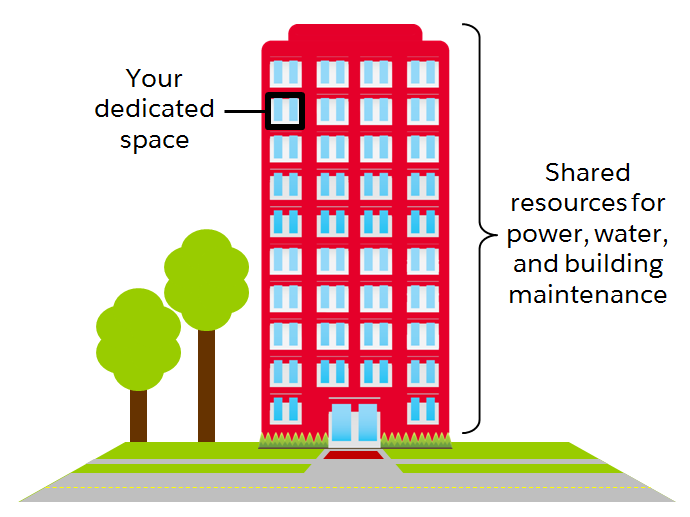
Salesforce is set up more like an apartment building. Your company has its own space in the cloud, but you have all kinds of neighbors, from mom-and-pop shops to multinational corporations.
This idea is multitenancy. Salesforce provides a core set of services to all our customers in the multitenant cloud. No matter the size of your business, you get access to the same computing power, data storage, and core features.
Trust and multitenancy go hand in hand. Despite the fact that you’re sharing space with other companies, you can trust Salesforce to keep your data secure. You can also trust that you’re getting the latest and greatest features with automatic, seamless upgrades three times a year. Since Salesforce is a cloud service, you never have to install new features or worry about your hardware. All this is possible because of multitenancy.
Metadata is data about data.  When we say data about data, we’re really talking about the structure of your Salesforce org.
Let’s think about an object like Property. When our friends at DreamHouse use Salesforce, they input and view data about properties. For example, a property can be located in Boston, cost $500,000, and have 3 bedrooms.
Now, imagine you stripped away all that specific data. What are you left with? You are left with the Property object along with all its fields, like address, price, and number of bedrooms. You can also have page layouts, security settings, and any other customizations you’ve made.
All of these standard and custom configurations, functionality, and code in your org are metadata. Part of the reason you can move so fast on the platform is that Salesforce knows how to store and serve you that metadata immediately after you create it.
APIs allow different pieces of software to connect to each other and exchange information.
If that sounds kind of abstract, take a quick look at the computer you’re working on right now. You can probably find a series of ports of various shapes and sizes that support different kinds of connections. These are like the hardware version of APIs. You don’t have to know how the USB port works. All you have to understand is that when you plug your phone into a USB port, it passes information to your computer.
APIs are similar. Without knowing the details, you can connect your apps with other apps or software systems. The underlying technology takes care of the specifics of how information passes throughout the system.
When you add a custom object or field, the platform automatically creates an API name that serves as an access point between your org and the database. Salesforce uses that API name to retrieve the metadata and data you’re looking for.
For example, we can use a contact’s Name field in a bunch of places, like the Salesforce1 mobile app, a custom page, or even an email template. That’s all possible because of the API name.
The core of the API’s power is that all of your data and metadata is API enabled. This might not seem like a big deal right now, but the API gives Salesforce insane flexibility. And we mean insane.
While it’s truly amazing that you can integrate your Salesforce data with Minecraft, there are also many practical applications for the API. Every time you use Salesforce, whether you’re using standard functionality or building a custom app, you’re interacting with the API.

There are three main categories in the Setup menu: Administration, Platform Tools, and Settings. Let’s take a look at what’s available.


  • Administration: The Administration category is where you manage your users and data. You can do things like add users, change permissions, import and export data, and create email templates.
  • Platform Tools: You do most of your customization in Platform Tools. You can view and manage your data model, create apps, modify the user interface, and deploy new features to your users. If you decide to try your hand at programmatic development, Platform Tools is where you manage your code as well.
  • Settings: Finally, Settings is where you manage your company information and org security. You can do things like add business hours, change your locale, and view your org’s history.
1   Company Information
  • At-a-glance view of your org
  • Find your org ID
  • See your licensing information
  • Monitor important limits like data and file usage
2 Users
  • Reset passwords
  • Create new users and deactivate or freeze existing users
  • View information about your users
3 Profiles
  • Manage who can see what with user profiles
  • Create custom profiles
4 View Setup Audit Trail
  • See 6 months of change history in your org
  • Find out who made changes and when
  • Tool for troubleshooting org configuration issues
5 Login History
  • See 6 months of login history for your org
  • View date, time, user, IP address, and more login data
  • Use for security tracking and adoption monitoring
Salesforce has a community of partners that use the flexibility of the Salesforce platform to build amazing apps that anyone can use. These apps are available (some for free, some at a cost) for installation on AppExchange.

Follow these steps to develop a good AppExchange strategy.
  1. Identify departments that use or plan to use Salesforce. These are your primary stakeholders.
  2. Research what’s available on AppExchange that best meets your stakeholder requirements. Discuss business cases with department heads to determine exact needs. Here are some good questions to ask:
    1. What business problem are you trying to solve?
    2. What are your main pain points right now?
    3. How many users need this app?
    4. What’s your budget?
    5. What’s your time line?
    These questions help you identify apps that are the best fit for each department or business case.
  3. When you find an app that you think meets your needs, download the app in a test environment (like a free Developer Edition or sandbox). Ensure that the app you’re installing doesn’t interfere with any other apps you’ve installed or customizations you’ve made.
  4. If you’re choosing between multiple apps, take some time to evaluate what you’ve tested. Determine whether there are feature gaps or unwanted functionality. If necessary, invite your stakeholders to demo the apps and provide feedback.
  5. You’re ready to go! You’ll install and deploy your app in your production environment. Make sure you keep your users in the loop about what’s changing, and provide training and documentation as necessary.
Sandboxes are copies of your organization in a separate environment. They’re used for development and testing. See Sandbox Overview.
Apps are installed using something called a package. To find the package:
  1. From Setup, search and select Installed Packages in the Quick Find box.
  2. Click the name of the package you installed. It will be the same name from the AppExchange download page.
  3. Click View Components to see more information about the package. The Package Details page shows you all the components, including custom fields, custom objects, and Apex classes in the package. This information helps you determine whether you have any conflicts in your own customizations.
As you start to explore AppExchange, be sure to check out free apps provided by Salesforce Labs. The great thing about Salesforce Labs apps, other than that they’re free, is that they’re open source. You can customize them as needed and peek under the hood to see how they work. It’s a great way to learn more about how the platform works.

Lightning Inter-Component Communication Patterns

Lightning Inter-Component Communication Patterns If you’re comfortable with how a Lightning Component works and want to build producti...